Founding offer Growth at half price · 100 places left

Plan it. Approve it. Deliver it.

Tickmarkd replaces the WhatsApp groups and spreadsheets agencies use to run their clients. Your clients approve with a tap, with no app to download.

Free for up to 3 clients No card needed Clients need no app

  • Social media agencies
  • Design studios
  • Video editing teams
  • SEO agencies
  • Performance marketers
  • Content studios
  • Branding studios
  • Web studios
  • Freelancers growing into a team
The problem

One WhatsApp group per client. One for the team. And a planner nobody updates.

How most agencies run today

A WhatsApp group for every client

Briefs, files and feedback scroll away. Every request means another follow-up.

The planner lives in a spreadsheet

It gets re-shared with designers, copied, renamed. Someone always works from an old version.

Approvals lost in chat

A thumbs-up in a group isn’t a sign-off. Posts get missed and nobody can prove what was agreed.

The Tickmarkd way

  • One link for every client

    Requests, files, comments and voice notes stay with the job, under your agency’s name.

  • One sheet gets the plan approved and the work done

    Plan the month, share it, and approved posts become the designer’s brief.

  • Every approval on record

    Who approved what, and when. No more “but you said ok on WhatsApp”.

Start free
How it works

From sign-up to approved posts in four steps

  1. 1

    Pick your services

    Design, video, social media, SEO, content. Ready-made request forms and prices come with each one, and you can change them.

  2. 2

    Invite your clients

    Add a client and send them an invite link by email or WhatsApp. They tap it, set a password and they’re in.

  3. 3

    Plan the month

    Fill the sheet, or paste last month’s planner from Excel. Then share it with the client.

  4. 4

    They approve, you deliver

    The client approves with a tap. Approved posts go to your design team, the client reviews the designs, and you mark them posted.

Along the way, clients can request extra work, pay invoices or their monthly plan, and see what’s included and what’s left.

What it does

Plan, approve, deliver, get paid, run the team.

Everything an agency does for a client, in the order it happens.

01 Plan

Plan a client’s month in a sheet.

  • Day, format, platforms, idea, caption, hashtags and notes, in one sheet per client
  • Paste your planner straight from Excel or Google Sheets; columns are matched for you
  • Copy last month in one click, laid out on the same weekdays
02 Approve

Clients approve with a tap.

  • Clients approve each post, or the whole month at once, and comment where something should change
  • They mark up finished designs and videos and ask for revisions in one place
  • Name who gives the final approval, set a reply-by date and let reminders do the chasing
  • Share a view-only link with anyone; approving needs a sign-in
03 Deliver

Approved posts become tasks.

  • No retyping: the approved post is the designer’s brief
  • Clients request one-off work through a form for each service, with files, references and voice notes
  • Weekly or monthly work is created for you, and each brand’s logos, fonts and files are kept ready
04 Get paid

Get paid without chasing.

  • Sell monthly plans at a flat price, paid by autopay through your own Razorpay account
  • Rupees or dollars, with a GST invoice made for every payment
  • Retainer usage shown to both sides, so renewals don’t need a phone call
  • Send an offer link on WhatsApp; the client signs up and pays on one page
05 Run the team

See who is doing what.

  • Every job with its status, deadline and assignee, on a queue and a calendar
  • The team ticks a quality checklist before every delivery
  • Reports on work delivered per client and per person
The content planner

One sheet gets the plan approved and the work done.

Paste a month from Excel, share it with the client, and watch it come back approved.

Paste from Excel or Google Sheets

Bring your existing planner in by copy and paste. Columns are matched automatically.

Copy last month

Lay out next month on the same weekdays in one click, then change what’s new.

Share a view-only link

Send the plan to anyone. Approving needs a sign-in, so every approval is on record.

More about the content planner

Inside Tickmarkd

The real app, not a mock-up.

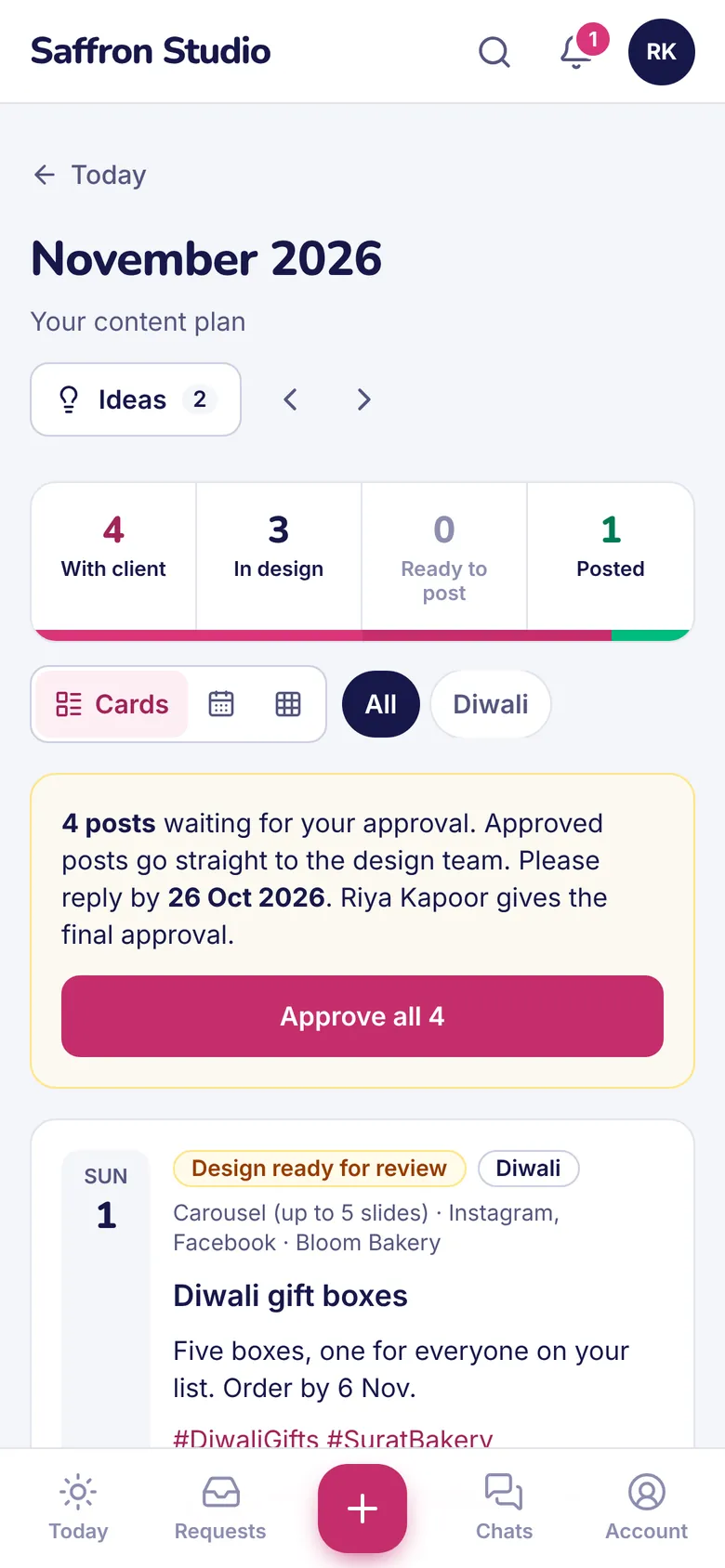
These are screens from Tickmarkd itself, with a made-up agency and its clients. On the left, a client’s comments pinned on a Diwali carousel. On the right, what the client sees on their phone.
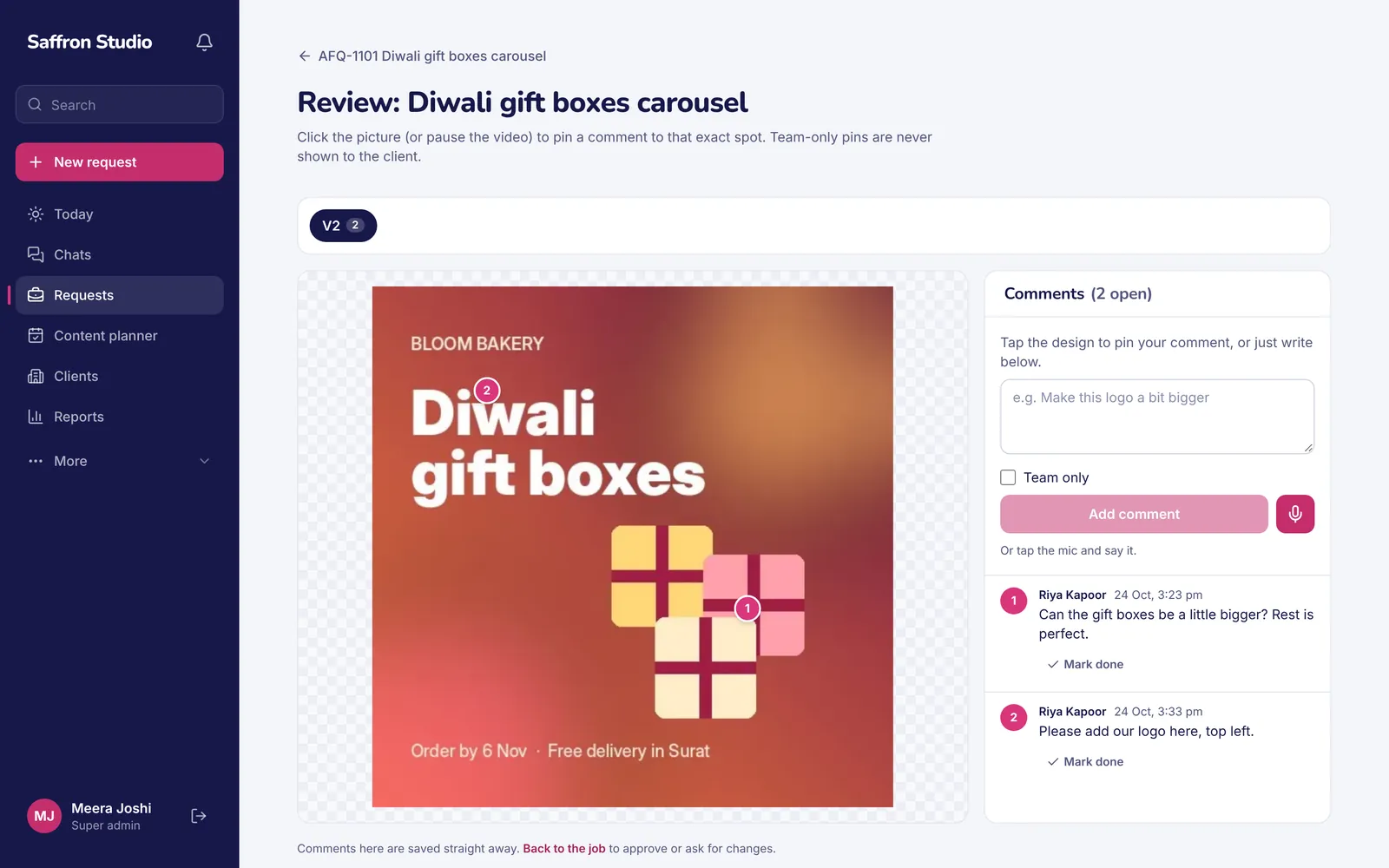
Design review in Tickmarkd: a client’s two comments pinned on a Diwali gift boxes carousel, with the comment list beside it.
Design review: the client taps the design to pin a comment.
A client approving November’s content plan on a phone, with an Approve all 4 button.
The month’s plan, approved on the phone.
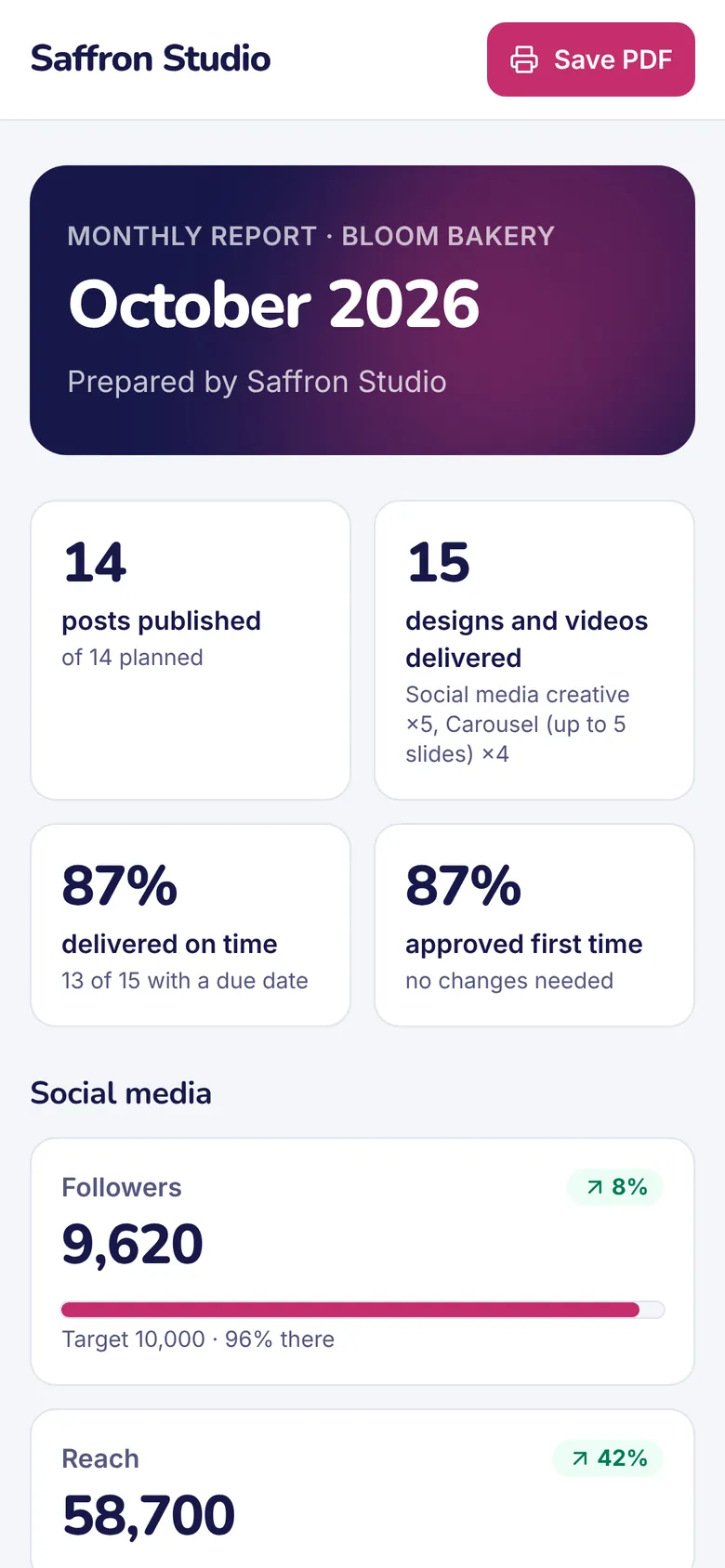
The monthly client report on a phone: posts published, designs delivered, on-time and first-time approval.
The monthly report the client receives.

See every part of the product

For your clients

Your clients don’t download anything.

They tap a link, see the plan, approve or comment, and they’re done. It opens in the phone’s browser and can be added to the home screen.

  • Comment on images and videosPin a comment exactly where the change is needed.
  • Voice notes, like on WhatsAppClients record feedback; it stays with the job.
  • Request new workA simple form for each service, with files and references.
  • Pay invoices and monthly plansAnd see what’s included and what’s left this month.
  • Guest links for one-off clientsA link that signs them in with a tap.

Coming soon WhatsApp notifications, sign-in with a phone code, and voice notes turned into text.

Built by an agency

We run our own clients on it, every day.

Tickmarkd was built by AFFINIQ, a creative agency in Surat, to run its own clients, and AFFINIQ runs on it every day. It’s made for the problems every agency knows: a lost approval, a designer working from last week’s sheet, a client asking what they got this month.

Read our story
  • AFFINIQ Creative agency, Surat
  • India first ₹, GST, Razorpay and WhatsApp habits built in
  • For 2–50 people Freelancers growing into a team, up to busy studios
Pricing

Free for up to 3 clients. Simple after that.

Client logins are free and unlimited on every plan. Every new agency gets 14 days of Growth free.

Free

For trying it with your first few clients.

₹0 for ever

No card needed

  • 3 clients
  • 2 team logins
  • 5 GB storage
Start free

Starter

For small studios putting their own name on it.

₹999 /month

+ GST · or ₹9,990 a year (2 months free)

  • 15 clients
  • 5 team logins
  • 50 GB storage
Start free trial

Scale

For larger agencies with many clients.

₹5,999 /month

+ GST · or ₹59,990 a year (2 months free)

  • Unlimited clients
  • Unlimited team logins
  • 1 TB storage
Start free trial
Founding offer

Growth at half price, for the first 100 agencies

  • ₹1,249 a month (or $24.50) instead of ₹2,499, for the first 12 months
  • That price is kept for 3 years
  • We set up your first 5 clients for free
100of 100
places left
Claim a founding place

Prices exclude GST. Applies to the Growth plan.

Compare every plan

Know which clients make you money.

Track time, make invoices and see profit per client with Tickbit, our sister product. A connection with Tickmarkd is coming soon.

Meet Tickbit
Questions

Things agency owners ask us

What is Tickmarkd?

Tickmarkd is a client portal and operating tool for creative and marketing agencies. Clients send requests, approve content plans and designs, and pay for their monthly plan in one branded portal, while your team works from one job queue with workload, deadlines and quality checks. It replaces the WhatsApp groups and spreadsheets most agencies run on.

Do my clients need to download an app?

No. They open a link in their phone’s browser and sign in. If they like, they can add it to their home screen so it opens like an app.

Can I bring my existing content calendar?

Yes. Copy your planner from Excel or Google Sheets and paste it into the Tickmarkd sheet. The columns are matched for you, and you can fix anything before you save.

What happens after the 14-day trial?

Every new agency gets 14 days of Growth, with 20 GB of storage during the trial. After that you move to the Free plan unless you choose a paid one. Nothing is deleted or locked: you keep your clients, plans and files, and clients already added keep working.

Will my clients see my agency’s brand?

Yes. Your logo, colours and name appear to clients, and on paid plans the portal can sit on your own web address. A small “Powered by Tickmarkd” line shows on Free and Starter and disappears on Growth and above.

How do I get paid?

Clients pay for their monthly plan through your own Razorpay account, by UPI or card, with autopay. You can also record bank transfers and cheques. Every payment issues a GST invoice in your name, and Tickmarkd never holds your clients’ money.

Is my data safe?

Each agency’s data is kept in its own separate database, and all app data is backed up every day. Your team can use 2-step login, each person gets their own role, and every upload is checked before it’s stored.

Do you work outside India?

Yes. Agencies in the US, UK, UAE, Canada and elsewhere can pay in dollars, and bill their own clients abroad in dollars without GST. India is our first focus, so payments, GST invoices and WhatsApp habits are built in from day one.

More answers in Help, or ask us on WhatsApp.

Move your first client over today.

Free for up to 3 clients. 14 days of Growth free, no card needed.